Ms. Anne
Members
-
Joined
-
Last visited
Everything posted by Ms. Anne
-
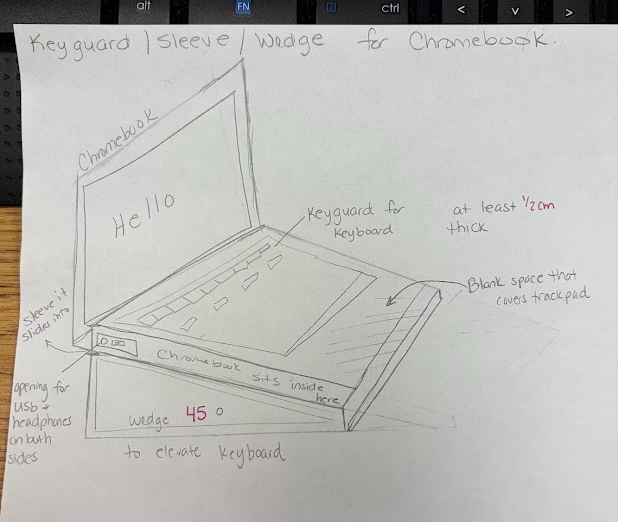
Hi everyone—I'm reaching out in hopes of finding someone in this amazing community who might be willing to help us design a custom 3D-printable adaptive device for a student. I’m a PreK special educator working with a kindergarten student, “E,” who has a rare form of muscular dystrophy called Pelizaeus-Merzbacher leukodystrophy (a genetic condition that affects the brain and spinal cord, leading to challenges with muscle control, coordination, and movement). We’re hoping to create a combined Chromebook sleeve/keyguard/wedge for his device (model N20Q10) that would support greater independence and access to learning and communication. The idea includes: A wedge to angle the keyboard so he can better see the keys A keyguard to help isolate individual keys A protective sleeve with a keypad blocker to reduce unintended key presses due to uncontrolled movements Our goal is simple but meaningful: give E more independence, improve his ability to communicate, and help him more fully access his education. We do have access to a 3D printer, but we need help with designing and creating the model file. I’ll attach a visual to help illustrate what we’re envisioning. If anyone is willing to collaborate or even point us in the right direction, we would be incredibly grateful. This could make a huge difference for a really special kid. Thank you so much 💛