



lilyclark
-
Joined
-
Last visited
Posts posted by lilyclark
-
-
Edited by lilyclark
As the title says, I’ve been wanting to try 3D printing a part recently. Its edge is damaged, but the seller says I have to replace the whole thing, which feels like such a waste. If there are any online tutorials available, please share them with me for reference. Thanks, everyone.
Update:I finally decided to purchase the same type of material, haha, but I still welcome any related learning resources if you’d like to share them.
-
 1
1
-
-
4 hours ago, Max Funkner said: I’ve tested a few filament dryers and always keep them handy. I would still recommend having a filament dryer available — especially if you live in humid regions like the UK, for example. Moisture is everywhere.
Let’s say you open a spool and leave it printing overnight. When you seal it back using a vacuum pump and desiccant dehumidifiers, that may not be enough to restore the humidity to ideal levels. In such cases, I recommend drying the filament before sealing it — when needed.
It also depends on the filament type. For some engineering-grade materials like PA12-CF, manufacturers even recommend using a filament dryer for a few hours before printing, including with brand-new spools.
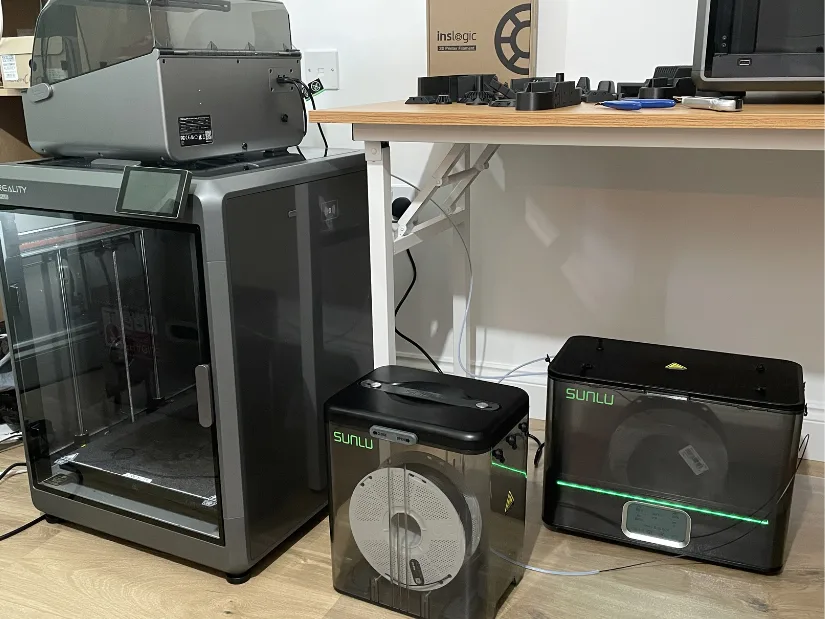
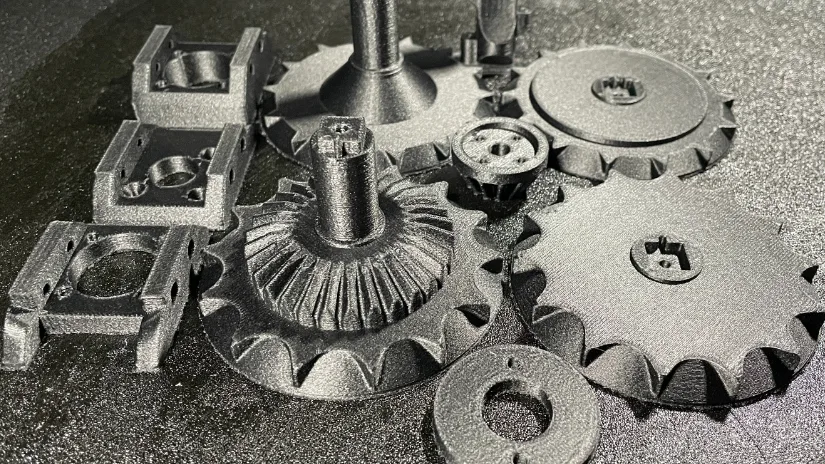
Here’s my test with Inlogic PA12-CF and PA6-CF. Brand-new filament is dried in the SUNLU E2, then fed into the Creality K2 Plus via a PTFE tube. Maybe overkill — but I got beautiful, functional prints!
Thanks for the reply! I’ve decided to go ahead and get one in the end. Even though it’s just for home use, it’s still pretty frustrating to spend several hours printing something only for it to fail.
-
1
-
-
Great attempt! I’ve been wondering whether it’s really necessary to get a filament dryer — have you ever used one?
-
1
-
-
On 6/24/2025 at 7:36 PM, Max Funkner said: Hi Lily,
Thanks so much for being active on our new forum. We appreciate it!
We have a detailed guide on filament dryers, many of which have been tested by different authors. Depending on the spool size and use case, some dryers are better suited than others. For example, Polymaker’s dryer and storage boxes are ideal for single spools and casual users, while SUNLU’s products are well-suited for drying bulk spools or engineering-grade materials. Check out the guide!
You're very welcome ,that helped me a lot.
-
Edited by lilyclark
Hahahaha, the puppy loves it—he really seems to like that big guy! I also recently noticed that the filament at home has become damp; the printed parts are coming out darker in color. I'm currently thinking about whether to buy a filament dryer. Looking forward to your feedback!
-
1
-
-
On 5/28/2025 at 6:20 PM, Danijel Djukic said: Hello everyone. I have a problem with the Anycubic Cobra S1 combo. While I was accidentally removing the front cover on this printer, I cut the wires that are used for the fan that cools the model, and since then that fan hasn't been working when I reconnect it to its place. I tested the fan itself, and it works without any problems, but when I reconnect it to its place, it won't start at all when I begin printing. I'm wondering if anyone understands whether a short circuit might have caused some damage to the board behind the hotend where the fan connects, or if the problem is something else?
Yes, it is highly likely that when the wires were cut, they momentarily touched (created a short circuit), which damaged a small component on the printhead board where the fan connects. Since you've confirmed the fan itself works, the problem is almost certainly with the board that provides power to it.
-
 1
1
-
-
Edited by lilyclark
Great post! I just printed a toy tank for my niece with PLA the other day, and she absolutely loves it. I had never considered adding motorized parts inside, though. She would probably be even happier if it could be remote-controlled. Thanks!
-
1
-

Has anyone tried 3D scanning and then printing an object? I’m a beginner at modeling, and learning modeling has really been such a headache for me.
in General 3D Scanning Discussions
I’m very sorry that I can’t provide a picture at the moment as I’m away on a business trip and don’t have the item with me. However, it’s a gear — a part from my child’s toy train. My plan is to buy various models of similar gears and see which one fits best. Thanks again for your reply.