Jump to content
View in the app

A better way to browse. Learn more.

3DWithUs

A full-screen app on your home screen with push notifications, badges and more.

To install this app on iOS and iPadOS
  1. Tap the Share icon in Safari
  2. Scroll the menu and tap Add to Home Screen.
  3. Tap Add in the top-right corner.
To install this app on Android
  1. Tap the 3-dot menu (⋮) in the top-right corner of the browser.
  2. Tap Add to Home screen or Install app.
  3. Confirm by tapping Install.

Leaderboard

Popular Content

Showing content with the highest reputation on 01/13/26 in Posts

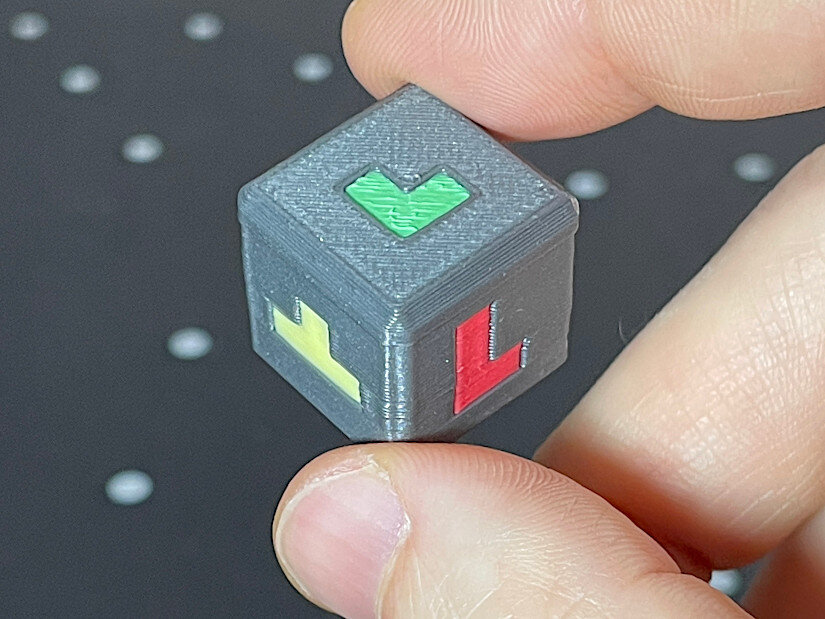
  1. Great project! Good luck in the Balancing Games contest. I printed the dice so far. It came out nicely. It’s a shame it takes so many color changes for the multicolor version (four colors). It took me 120 color changes and over seven hours to print, with a lot of purging. Hopefully, the next generation of tool- or nozzle-changing printers will make printing multicolored dice more feasible. I can imagine that in this game, if you print many more objects, there could be two dice — one for the shape and another for the color code.
Configure browser push notifications

Chrome (Android)
  1. Tap the lock icon next to the address bar.
  2. Tap Permissions → Notifications.
  3. Adjust your preference.
Chrome (Desktop)
  1. Click the padlock icon in the address bar.
  2. Select Site settings.
  3. Find Notifications and adjust your preference.