Multi-color 3D printing has become one of the most visible trends in desktop and prosumer FDM 3D printing. From decorative models to functional parts with different materials, the appeal is clear. The challenge, however, is that many current systems still rely on filament switching through a single extrusion path, which often leads to purging, wasted material, and longer print times.
Newer hardware approaches are now trying to solve this problem differently. Instead of treating waste as an unavoidable part of multi-color printing, some systems are moving toward nozzle switching, where each color or material can be handled by a dedicated nozzle. One example is the MOVA AtomForm Palette 300, a 12-nozzle FDM 3D printer showcased at RAPID + TCT 2026 in Boston.
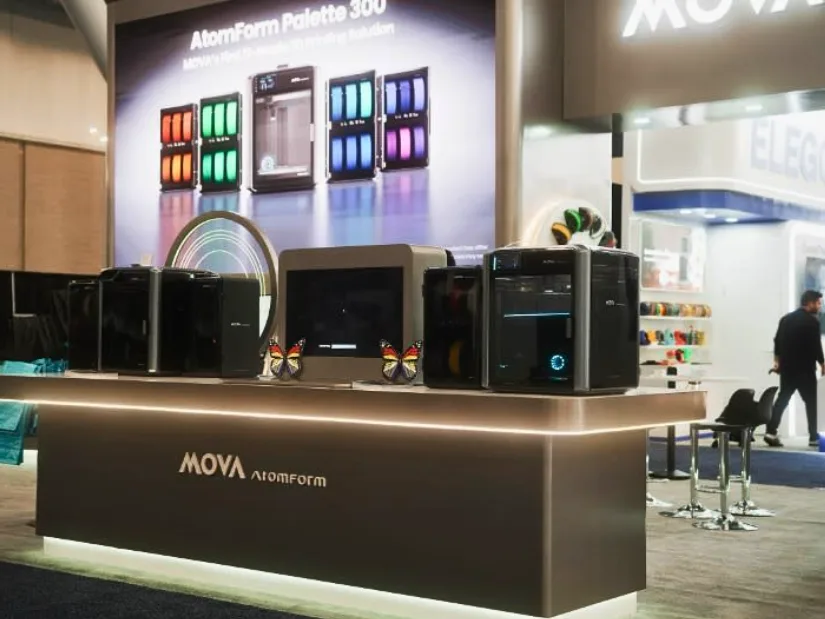
Image: MOVA AtomForm
Table of Contents (Jump to a Section)
- Why Traditional Multi-Color 3D Printing Creates Waste
- How Filament Switching Works
- Nozzle Switching vs Filament Switching
- MOVA AtomForm Palette 300 and 12-Nozzle Switching
- Workflow Efficiency Beyond the Printhead
- AtomForm Studio, AtomVerse, and the Software Layer
- Design Recognition
- A More Practical Direction for Multi-Color 3D Printing
Why Traditional Multi-Color 3D Printing Creates Waste
In conventional multi-color FDM 3D printing, the machine usually changes material by feeding different filaments through the same nozzle. Each time the material changes, the printer has to remove the previous color or material from the melt zone before the next one can print cleanly.
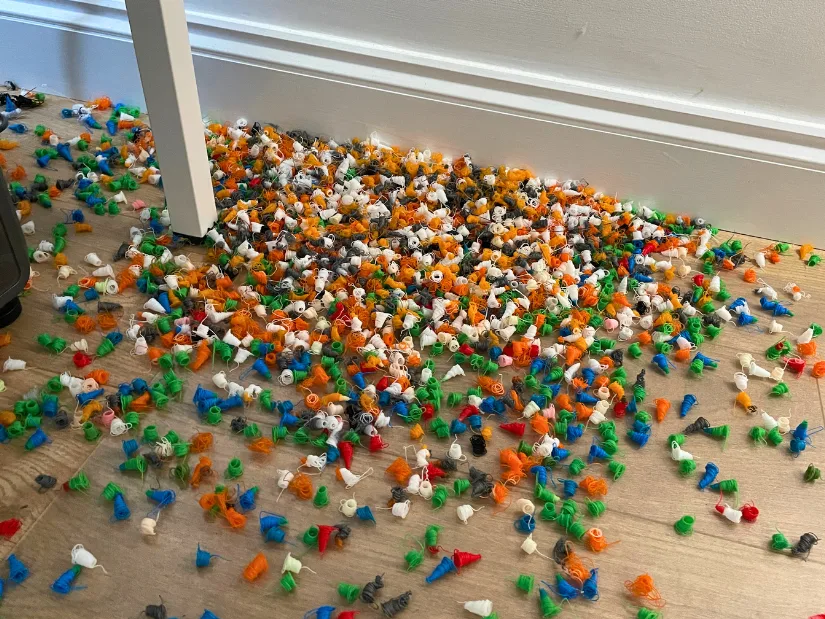
This purge material does not become part of the final model. It is printed as waste, often in the form of purge lines, purge blocks, or towers. On simple two-color models, this may be acceptable. On complex multi-color prints with hundreds or thousands of color changes, the amount of wasted material can become significant.
©3DWithUs – Photo: Max Funkner
The problem is not simply that the printer uses several colors. The deeper issue is the technical logic of switching materials through a shared nozzle. When one nozzle has to handle all materials in sequence, contamination prevention usually requires purging.
That is why multi-color 3D printing efficiency is becoming a hardware question as much as a software question. Slicing strategies can reduce waste, but the physical extrusion system still determines how much purging is needed during material transitions.
How Filament Switching Works
Filament switching is the most common approach in many current multi-color FDM systems. The printer pauses or changes its feeding path, unloads or retracts one filament, loads another, and then purges the nozzle until the new color or material flows correctly.
The advantage of this approach is that it can add multi-color capability without requiring multiple complete hotends. It can also work well for hobby users who mainly want colorful models, signs, figures, and decorative prints.
The downside is that every switch takes time and produces waste. The more color changes a model has, the more the printer spends time. This can increase both print time and material consumption.
For users printing occasional colorful objects, this may be a reasonable trade-off. For larger prints, frequent color changes, or small-batch production, the efficiency loss becomes more noticeable.
Nozzle Switching vs Filament Switching
Nozzle switching takes a different approach. Instead of pushing multiple filaments through the same melt path, the printer changes the active nozzle. In theory, this allows each color or material to stay assigned to its own dedicated extrusion path.
This distinction matters because the transition happens at the nozzle level rather than by flushing a shared nozzle. If each material has a dedicated nozzle, the printer may need less purging between changes. This can reduce wasted filament and shorten transition cycles.
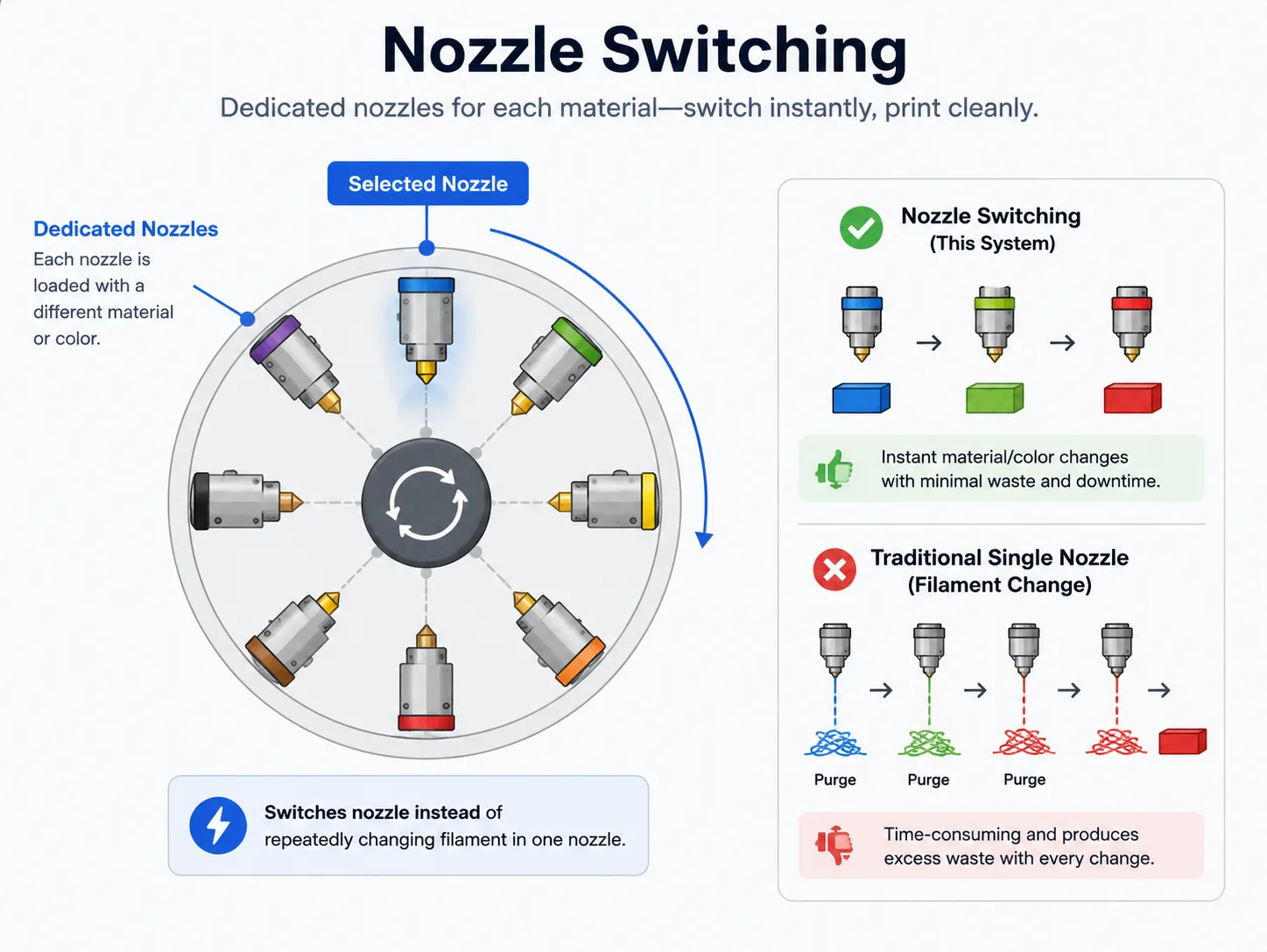
Illustration: 3DWithUs
Nozzle switching can also support multi-material printing more naturally. Some materials do not behave well when repeatedly loaded, unloaded, and pushed through the same nozzle path. A dedicated nozzle setup may help reduce contamination and simplify transitions between materials with different properties.
This does not mean nozzle switching is automatically better in every situation. It can add mechanical complexity, calibration requirements, cost, and maintenance considerations. However, as multi-color and multi-material printing becomes more ambitious, the hardware route becomes increasingly interesting.
MOVA AtomForm Palette 300 and 12-Nozzle Switching
The MOVA AtomForm Palette 300 is one recent example of a nozzle-switching approach. According to the supplied product information, it uses the proprietary OmniElement™ Fully Automatic Nozzle Switching System, built around a 12-nozzle automatic switching architecture.
Where to Buy the MOVA AtomForm Palette 300
Price from: Coming soon …
Preorder:
Official Store
Instead of repeatedly flushing one nozzle during material transitions, the system selects a dedicated nozzle for the required color or material. In practical terms, this changes the efficiency model of multi-color printing.
Because the transition happens through nozzle selection rather than constant filament purging, the need for transition waste can be reduced. This may be especially useful for models with many color changes, multi-material parts, or print jobs where time and material efficiency matter.
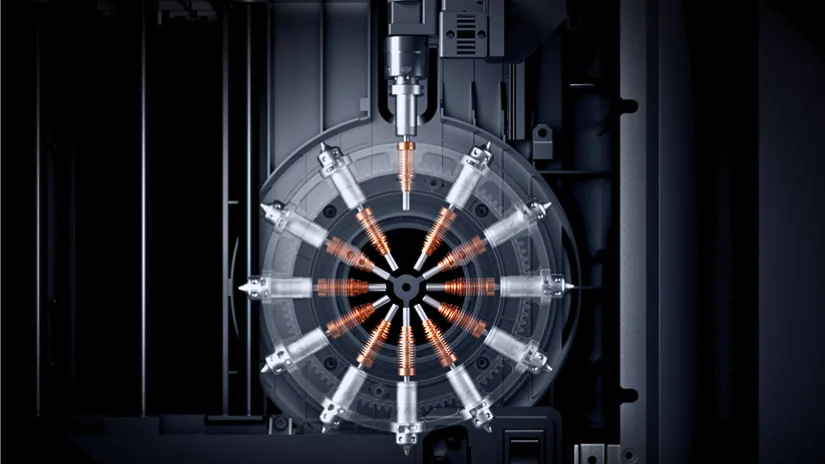
Image: MOVA AtomForm
For users familiar with filament-switching systems, the main difference is easy to understand. Filament switching changes what goes into one nozzle. Nozzle switching changes which nozzle is actively printing.
That change may sound simple, but it has important workflow implications. Less purging can mean less wasted filament, shorter transition time, and fewer large purge structures next to the printed model.
Workflow Efficiency Beyond the Printhead
The potential efficiency gain is not limited to material savings. A nozzle-switching architecture may also support more consistent workflow continuity in multi-color and multi-material jobs.
Long prints are often affected by repeated color transitions. Every transition adds time, and every purge cycle introduces another opportunity for waste, inconsistency, or failure. When transitions become more efficient, total print time may be reduced, and production planning becomes easier to manage.
On the MOVA AtomForm Palette 300, this hardware approach is supported by other system components. The RFD-6 modular filament management unit is designed to help with organized material handling, while the ReadyPrint system is intended to support workflow preparation and execution.
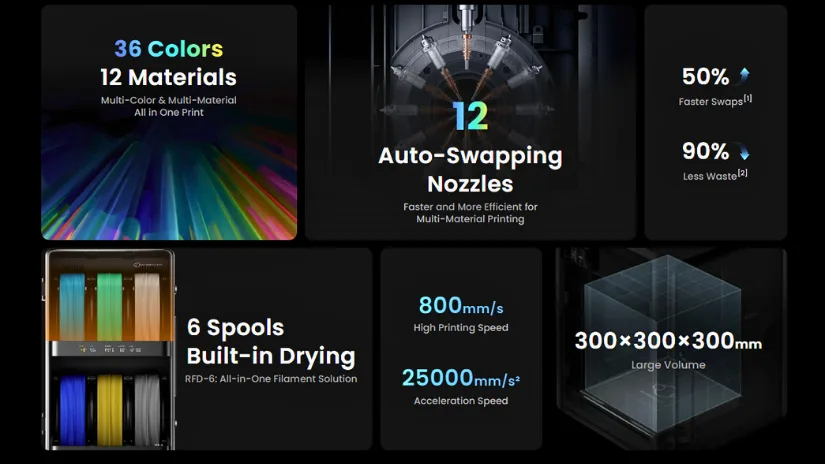
Image: MOVA AtomForm
This matters because printer productivity depends on the full workflow, not just the printhead. A machine may have advanced mechanics, but if material loading, job setup, and file preparation remain fragmented, the practical efficiency gains can be limited.
For that reason, the Palette 300 is best understood as a coordinated hardware and workflow system rather than a single isolated printhead feature.
AtomForm Studio, AtomVerse, and the Software Layer
Software still plays an important role in any hardware-led multi-color system. Within the MOVA AtomForm ecosystem, AtomForm Studio is positioned as the software layer for slicing, device management, and print preparation.
This is important because even with a more advanced nozzle-switching mechanism, users still need to prepare files, assign colors and materials, manage print settings, and control print tasks efficiently.
AtomVerse appears to operate at a different layer of the ecosystem. Rather than directly controlling the printing process, it focuses on model access, creation, and sharing. With AI-powered generation tools, educational resources, and an open model library, AtomVerse is positioned as a way to lower the barrier to 3D creation.
In simplified terms, the workflow can be viewed like this:
- AtomVerse helps users move from idea to printable model.
- AtomForm Studio helps prepare and produce the model efficiently.
- The Palette 300 hardware handles the multi-color and multi-material printing process.
This separation of roles makes sense. Creative access, print preparation, and hardware execution are different stages of the same workflow. When they are designed to work together, the overall user experience can become more streamlined.
Design Recognition
The Palette 300 has also received design recognition, including a MUSE Design Award Gold in the Product Design – 3D Printed category and an iF Design Award listing for the AtomForm Palette 300 Combo. For everyday users and small production environments, however, the more important question is how this type of hardware may help reduce waste, shorten transition times, and make multi-color 3D printing more practical.
A More Practical Direction for Multi-Color 3D Printing
As 3D printing matures, the focus has shifted from decorative models to professional efficiency and practical material handling.
Traditional filament-switching systems made multi-color 3D printing accessible but often accepted purging and waste as part of the process. The MOVA AtomForm Palette 300 challenges this, providing a direct market solution for efficiency. This system uses a 12-nozzle automatic switching system together with modular filament management, ReadyPrint workflow optimization, AtomForm Studio, and AtomVerse.
For users and businesses looking beyond simple decorative prints, the MOVA AtomForm ecosystem stands out as an innovative route toward reducing waste and improving continuity. Efficiency and smoother production workflows are now the major focus points as MOVA leads the evolution of multi-color and multi-material FDM 3D printing.