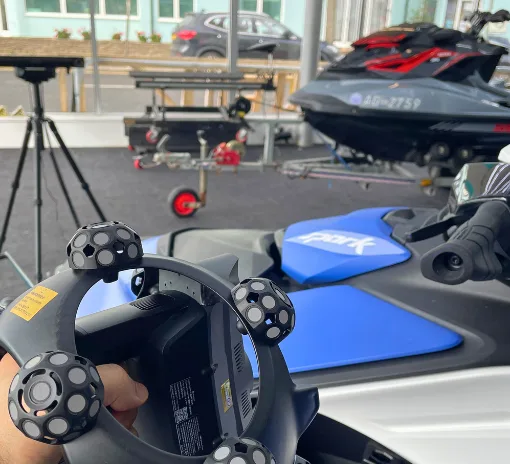
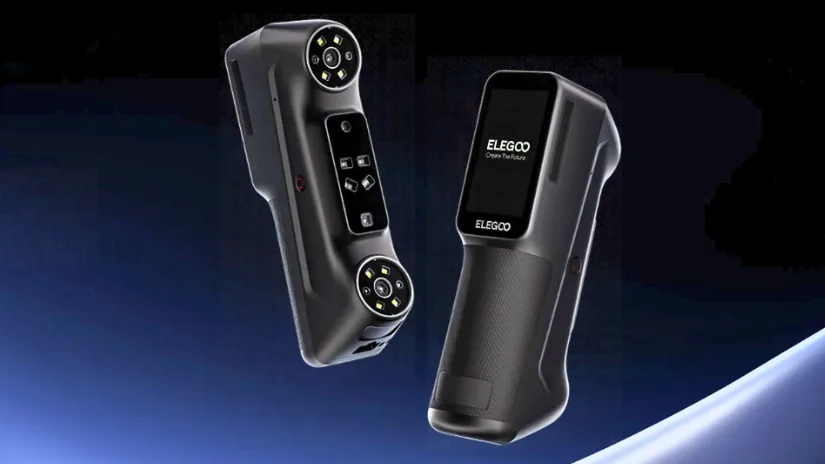
ELEGOO has officially entered the 3D scanning market with the M1 Ultra, an all-in-one handheld scanner combining blue laser and infrared structured light technologies. Announced on October 29, 2026, the device offers five scanning modes, a built-in touchscreen, wireless operation and a claimed blue laser accuracy of up to 0.02 mm.
Table of Contents (Jump to a Section)
Where to Buy the Elegoo M1 Ultra
Price: From $1,599
Compare the Prices & Bundles:
Official Website | Amazon
ELEGOO M1 Ultra Overview
ELEGOO is best known for its 3D printers, but the M1 Ultra marks its expansion into 3D scanning. This premium prosumer model targets creators, engineers, educators and makers who want to digitize physical objects for reverse engineering, customization, digital archiving and other projects. Rather than relying on a single scanning method, it brings several capture modes together in one handheld device.

Images: ELEGOO
ELEGOO lists a supported object size range from 5 × 5 × 5 mm to 4,000 × 4,000 × 4,000 mm, although the usable range depends on the selected scanning mode and conditions. The company also says the scanner can capture black and metallic surfaces without coating powder. Those are particularly interesting claims for practical scanning, and we look forward to testing them with real objects.
Five Scanning Modes
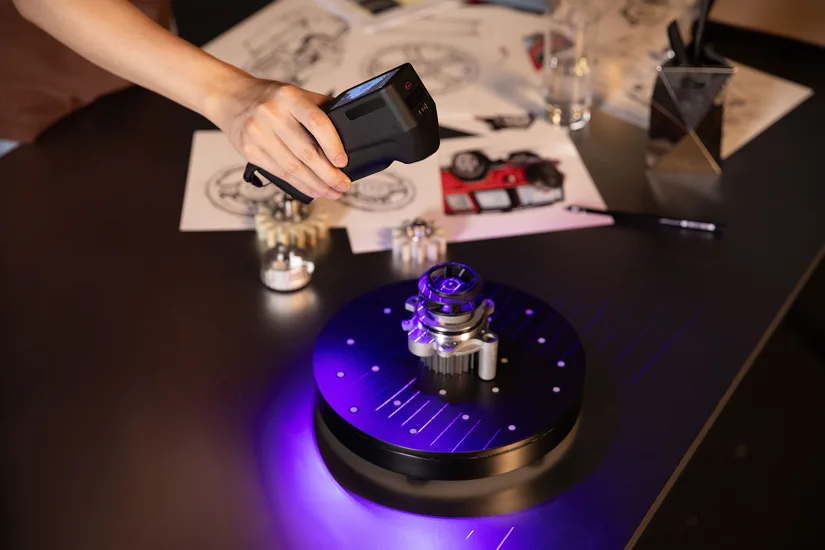
The M1 Ultra combines three blue laser configurations, an infrared structured light mode and a marker-free blue laser option. Each mode is intended for a different type of object or scanning challenge.
- 34-line blue laser: Designed for faster coverage of medium to large objects.
- 7-line blue laser: Focused on fine details in small to medium-sized parts.
- Single-line blue laser: Intended for deep holes, narrow gaps and difficult-to-reach geometry.
- Infrared structured light: Suited to faces, bodies and general object scanning.
- Marker-free blue laser: An option for objects where applying tracking markers is impractical.
Images: ELEGOO
These modes could make the scanner useful across very different projects, from mechanical parts to decorative objects. However, the ease of switching modes, tracking stability and performance on challenging surfaces will need to be assessed during our hands-on testing.
Accuracy and Scanning Performance
According to ELEGOO, the blue laser modes achieve accuracy of up to 0.02 mm and volumetric accuracy of 0.02 mm + 0.06 mm/m. Its infrared structured light mode has a separate stated accuracy of up to 0.05 mm.
The scanner uses an all-glass optical system, camera calibration and temperature compensation. Global-shutter cameras are intended to reduce motion distortion, while 24-bit full-color texture mapping and image processing aim to preserve the appearance of scanned objects. For scanning speed, the media guide lists up to 2,040,000 points per second for the 34-line laser mode and up to 6,451,200 points per second in near-infrared mode.

Images: ELEGOO
For makers, specifications are only part of the story. Mesh quality, small-feature reproduction, alignment and the amount of cleanup needed before 3D printing are just as important. We will explore these areas once our test unit arrives.
Portable Design and Wireless Scanning
One of the more distinctive features of the M1 Ultra is its 3-inch HD touchscreen, which supports real-time preview and settings adjustments. The handheld scanner weighs a stated 511 g with batteries installed and measures 191 × 50 × 76 mm.
Wi-Fi 6 connectivity and a swappable 4,800 mAh battery allow wireless scanning for up to 1.5 hours per charge, according to ELEGOO. This should provide more freedom when moving around larger objects, including automotive interiors and other locations where a cable can be inconvenient.

Images: ELEGOO
Importantly, wireless scanning does not mean the entire workflow is standalone. ELEGOO states that a compatible computer running ELEGOO SCAN is required to process captured data. We will examine how the touchscreen, wireless connection and PC software work together during our review.
ELEGOO SCAN Software and Workflow
ELEGOO SCAN is the company’s companion application for preparing scanning projects and converting captured data into usable 3D models. Its advertised features include guided setup, tracking assistance, multi-scan alignment and automated processing for mesh generation, optimization and color mapping.
The typical workflow begins with connecting and calibrating the scanner, creating a project, selecting the scanning mode and applying tracking markers when required. After capturing the object, users can align and process the data before exporting the resulting model.
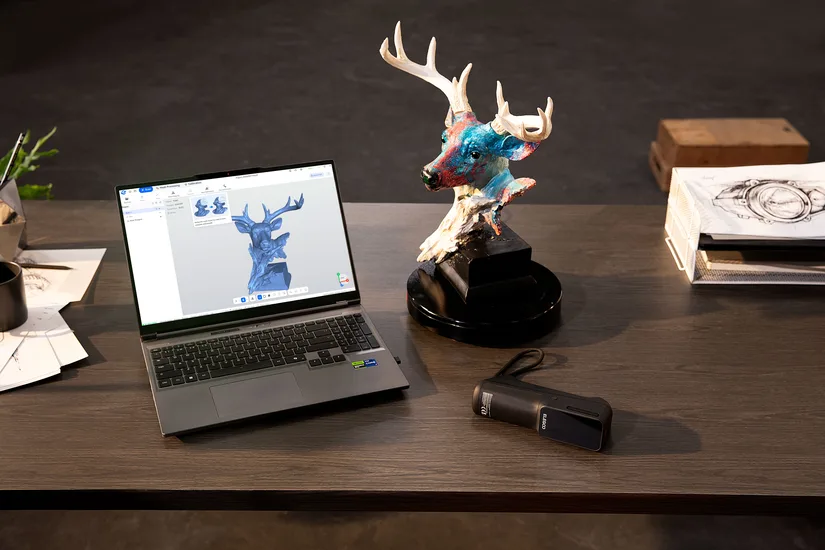
Images: ELEGOO
The software supports STL, OBJ, PLY, and ASC exports for further work in third-party applications. STL could be particularly useful for 3D printing, while textured formats such as OBJ and PLY may be suitable for digital archiving and visualization, depending on how they are exported.
Key Specifications and PC Requirements
| Feature | ELEGOO M1 Ultra |
|---|---|
| Scanning technologies | Blue laser and infrared structured light |
| Scanning modes | 34-line, 7-line, single-line, infrared, marker-free blue laser |
| Blue laser accuracy | Up to 0.02 mm (manufacturer specification) |
| Infrared accuracy | Up to 0.05 mm (manufacturer specification) |
| Smallest stated scan volume | 5 × 5 × 5 mm (blue laser) |
| Screen | 3-inch HD touchscreen |
| Wireless connectivity | Wi-Fi 6 |
| Battery | 4,800 mAh, swappable; up to 1.5 hours wireless scanning |
| Weight | 511 g, including batteries |
| Dimensions | 191 × 50 × 76 mm |
| File exports | STL, OBJ, PLY, ASC |
| Operating systems | Windows and macOS |
PC requirements: ELEGOO recommends Windows 10/11 with an Intel Core i7 13th Gen or newer, an NVIDIA RTX 4060 or newer with 8 GB VRAM, and at least 32 GB RAM. For macOS, the recommendation is macOS 14 or later, Apple M4 or newer, and at least 32 GB RAM. Lower minimum configurations are listed in the media guide, but the higher recommended specification is worth considering for larger scans and processing workloads.
Price and Availability
The ELEGOO M1 Ultra launches on October 29, 2026, with a regular retail price of $1,699 / £1,399 / €1,699. ELEGOO is also offering introductory pricing from October 29 to November 12, 2026, at $1,599 / £1,319 / €1,599. Pricing and regional availability should be confirmed on ELEGOO’s official website.
Hands-On Review Coming Soon
On paper, the ELEGOO M1 Ultra looks like an interesting addition to the growing handheld 3D scanner market. Its combination of multiple laser modes, infrared scanning, a touchscreen and wireless operation offers plenty to explore. Of course, specifications alone cannot tell us how well a scanner performs in real projects.
3DWithUs will update this same article with a full hands-on review once the M1 Ultra arrives and our testing is complete. We plan to cover scanner setup, ELEGOO SCAN software, practical scanning examples, mesh processing and 3D printing applications. Our own test images and conclusions will replace this First Look assessment where appropriate. Stay tuned.